
25 KiB
Section 1 / Chapter 1 / Hello World
Overview
We start out with a C++ program kind-of-like "Hello World" and break it down into several versions which are closer and closer to a high level assembly language (otherwise known as C). At the last step, we convert the C into ARM V8 assembly language.
At every step, we'll completely explain the code and document what has changed from version to version so that little background is assumed.
V1 in C++
Here is the code to a program that prints to the console, the contents
of argv, that is: the command line arguments specified when the
program is run from the shell.
#include <iostream>                                                     // 1
                                                                        // 2
using namespace std;                                                    // 3
                                                                        // 4
int main(int argc, char * argv[]) {                                     // 5
    while (*argv) {                                                     // 6
        cout << *(argv++) << endl;                                      // 7
    }                                                                   // 8
    return 0;                                                           // 9
}                                                                       // 10
Here is a link to the program without line numbers.
Here is the output of this program:
% ./a.out one two "three plus four"
./a.out
one
two
three plus four
%
As you can see in the output, the program printed each of the command line parameters in the order in which they were specified. These come to your program stored in an array called
(by convention) argv as the second parameter to main().
Line 1
Line 1 makes available the default output stream cout. cout stands for console output. The angle brackets (< and >) indicate the include file iostream comes from a language or system supplied directory as opposed to an include file written by you.
For an explanation of what an include file is and how it fits into the compilation workflow see here.
Line 3
Line 3 is a common statement in C++ programs. It allows the use of many standard library features such as cout by typing fewer characters. In this case, for example, line 7 without the line 3 using would read:
std::cout << *(argv++) << std::endl;
Line 5
Line 5 is a function declaration declaring main. In command line
programs (and indeed in many non-command line programs), a function
called main is necessary. In all respects save one, main is an
ordinary user-written function. What makes main special is its name
and its parameters (typically called argc and argv). A function named
main is special because by default it is the function at which your
code will begin execution.
argc is an integer argument which specifies the number of non-null
arguments found by following the pointers contained in in argv. We will
explain non-null and pointers later.
In the case of the execution portrayed above, argv would have the value
of 4. argc always has a value of at least 1. This is because the
first command line argument accessible via argv is the path to the
program being executed. For our purposes, think of the path as like the name of the program.
argv is declared as a pointer to zero or more pointers to chars. The
concept of a pointer is essential to understanding assembly language.
Pointers are scary for new programmers. They don't have to be. When
you see the word pointer used, think address of something.
"pointer to a pointer" sounds even more scary but if you think of pointers as address of, then "pointer to a pointer" means something which contains the address of something else which itself hold the address of a thing.
In this case, the first something is argv. It contains the address of
an array holding 1 or more addresses of strings.
Here is a picture depicting this:
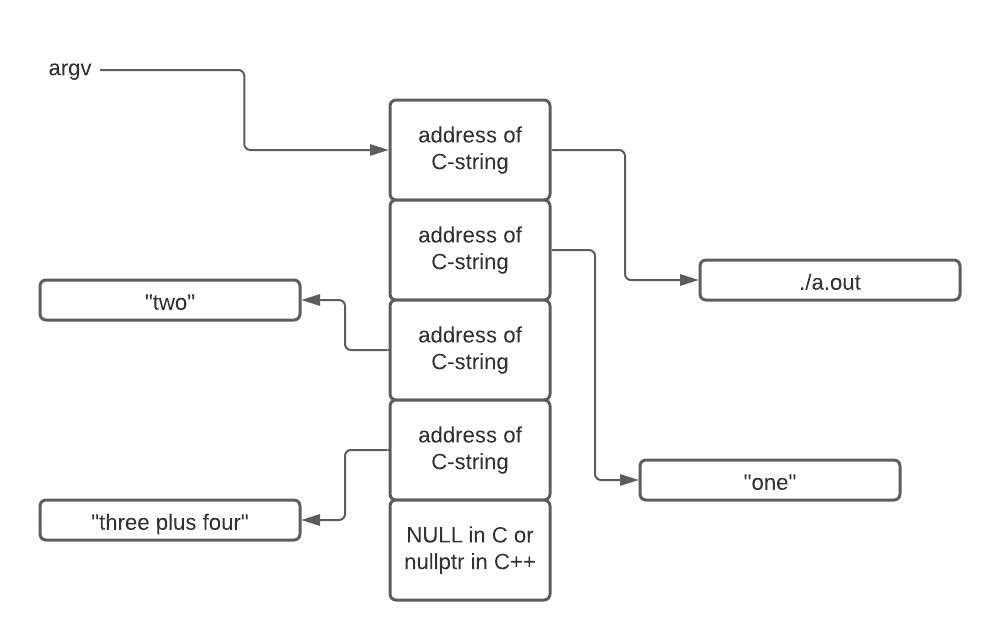
Explanation of "non-null"
The above diagram also illustrates what we mean by non-null.
argc contains the value of 4 in the case depicted by the image.
Looking at the array pointed to by
argv you will notice 5 boxes (or elements) arranged in a succession
of memory locations. The last is filled with a 0 or NULL. The first 4 entries are non-null (i.e. they contain a value other than 0).
The last element in the array contains a NULL in C (or
nullptr in C++) is not counted by argc because it is, in fact, null.
Be reminded that null is the value of 0. We will use this
fact (that the last value in the array is 0 to our advantage).
Line 5 Continued
One final comment about line 5 is that it currently reads
char * argv[]
accentuating the array property of argv but it could equivalently
have been written:
char ** argv
accentuating the pointer to a pointer (i.e. two successive *) quality of argv. Here the * indicates pointer. Two in a row means pointer to a pointer.
Line 6
while (*argv) {
introduces a while loop. The code (i.e. the body of the loop) will
repeatedly execute as long as the value inside the parenthesis is found
to be true (i.e. non-zero or specifically in our case non-null).
This loop will stop when *argv contains 0 (NULL).
Somewhere inside the body of the loop, the value of argv will be changed.
If it were not, the loop would not terminate (i.e. an infinite loop).
Line 6 could be redone as a for loop
Line 6 in this case could have been written using a for loop:
for (int index = 0; index < argc; index++)
Using this approach will result in more assembly language code being
generated along with the introduction of an otherwise unneeded variable
index. index will range from 0 to 3 (stopping when index ceases
to be less than 4). index would be used in figuring out which
member of argv is examined in each loop. We claim index is unneeded in
this case as we have a different way of moving through the argv array.
Line 7
Line 7 is where is action is. Firstly, cout will receive some value for printing. cout is an output stream and the << indicates something is being
shoved into it - i.e. is being output.
At the end of line 7 is endl. This is a C++ shorthand for printing a
new line. In total, line 7 prints something followed by advancing the
output to a new line.
What will be printed?
*(argv++) is complicated. Let's break it down.
We examine what is inside the parentheses first (as demanded by the rules governing the order of operations).
The value of argv is captured first. Recall this value is the address
of an address of some characters. This value is put aside for a moment but
will be used soon.
Next the value of argv is incremented (the ++). We know the value of
argv is captured first because the ++ comes after argv. This is
how argv changes so as to step through the elements of the array. At
some point argv will contain the address of a value 0 - and that's what
will terminate the while loop.
After argv is incremented, its previous value is dereferenced indicated
by the * outside the parentheses. Remember, we put the value aside before
incrementing it.
argv contains the address of something.
Dereferencing argv means "go fetch what is found at the address specified
by argv".
That, dear reader, is the address of the string of characters to be printed.
Line 8
Line 8 contains a matching brace for the opening brace found line line 6.
This marks the end of the while loop's body. The } causes a jump
back to evaluating what is pointed to by argv to see if it is now null (which
exits the loop). A synonym for jump is branch - remember this.
Line 9
This program is itself invoked by another program (in this case the shell).
The value returned by main is received by the program that launched this program. Line 9 causes the shell to be able to receive the value 0 which,
by convention, means our program exited normally.
Here's how to see a program's return value:
$ ./a.out
$ echo $?
0
$
The 0 is the program's return code.
V2
Here is version 2 of our program:
#include <iostream>                                                     // 1
                                                                        // 2
using namespace std;                                                    // 3
                                                                        // 4
int main(int argc, char * argv[]) {                                     // 5
    top:                                                                // 6
        if (*argv) {                                                    // 7
            cout << *(argv++) << endl;                                  // 8
            goto top;                                                   // 9
        }                                                               // 10
    return 0;                                                           // 11
}                                                                       // 12
Here is the original file.
In this version, we've moved a bit closer to assembly language by eliminating
the while loop replacing it with an if statement, a label and a goto.
Line 6
This line is a label. This is not an instruction, rather it is a way of specifying the address of an instruction (or data). Labels exist in assembly language, while loops do not, per se. Rather, you must code them yourself using some kind of branch instruction (remember above the word branch?) in this case the goto.
Line 7
The while loop has been removed. It has been replaced with explicit use of
an if statement at what was the top of the loop and a goto branch at what
was the bottom. This is how while loops are implemented - now we're
explicitly making this visible. For more information on while loops
see here
Line 9
The use of goto is normally frowned upon in modern higher level languages.
However, the feature or ability to use it still remains, left over from the earliest days of C.
The keyword goto is
followed by the label to which control should transfer. goto is an example of a branch and the label top is the target of the branch.
V3
In version 3 we eliminate the C++'ism of cout. cout doesn't exist in assembly language so we'll use puts instead to implement the same behavior
of the use of cout - namely the printing out of what is pointed to by
*argv and printing out a new line (done internally for us by puts).
At this point, there is no C++ left - only C.
#include <stdio.h>                                                      // 1
                                                                        // 2
int main(int argc, char * argv[]) {                                     // 3
   top:                                                                 // 4
       if (*argv) {                                                     // 5
           puts(*(argv++));                                             // 6
           goto top;                                                    // 7
       }                                                                // 8
   return 0;                                                            // 9
}                                                                       // 10
Here is the original code.
Line 6
puts as described above takes the address of a C string and prints it out with the addition of a trailing new line. What's going on inside the parentheses is identical to the previous versions.
For review, the current value of argv is put aside for reuse in a moment.
Then argv is incremented. Recall that argv is "the address of a variable holding the address of a string." Incrementing argv has the effect of moving on to the next string for the next iteration of the loop.
Then, the previous value of argv which we set aside, is dereferenced. *argv is the address of a string. That string is emitted by puts followed
by a new line.
Version 4
In this version we're decomposing the if statement even further so as to
eliminate the braces that were part of the previous version's if statement.
In general, braces in the higher level language serve as either branches or as labels.
#include <stdio.h>                                                      /* 1 */
                                                                        /* 2 */
int main(int argc, char * argv[]) {                                     /* 3 */
    top:                                                                /* 4 */
        if (*argv == NULL)                                              /* 5 */
            goto bottom;                                                /* 6 */
        puts(*(argv++));                                                /* 7 */
        goto top;                                                       /* 8 */
                                                                        /* 9 */
    bottom:                                                             /* 10 */
        return 0;                                                       /* 11 */
}                                                                       /* 12 */
Here is the original code.
Line 5
Notice how the sense of the if statement has reversed compared to the
previous version.
In the previous version, we call puts only if the value of *argv is not
null. By flipping the sense of the if statement, it means "if the value of
*argv is null, skip calling puts."
Line 6
We exit our decomposed loop by branching to a label beyond the goto
implementing the bottom of what was our while loop.
At this point we have devolved our program into just barely above the level of assembly language. In the next version, which is written in ARM V8 assembly language, you'll see that just about every instruction has a one to one correspondence to the C code in version 4.
Version 5 - in Assembly Language
Here is the same program written in ARM V8 assembly language.
    .global main                                                        // 1
main:                                                                   // 2
    stp     x21, x30, [sp, -16]!    // push onto stack                  // 3
    mov     x21, x1                 // argc -> x0, argv -> x1           // 4
                                                                        // 5
top:                                                                    // 6
    ldr     x0, [x21], 8            // argv++, old value in x0          // 7
    cbz     x0, bottom              // if *argv == NULL goto bottom     // 8
    bl      puts                    // puts(*argv)                      // 9
    b       top                     // goto top                         // 10
                                                                        // 11
bottom:                                                                 // 12
    ldp     x21, x30, [sp], 16      // pop from stack                   // 13
    mov     x0, xzr                 // return 0                         // 14
    ret                                                                 // 15
                                                                        // 16
    .end                                                                // 17
Here is the original code.
Get your bearings by noticing the labels. They are the same as in our previous version and perform the same roles.
Line 1
main is a function that is specially named. Line 1 instructs the assembler to make the name and location of main visible to the linker. To refresh your knowledge of the linker, see here.
Without Line 1, building the executable will fail with an unresolved symbol error - namely that the linker could not find main.
Line 2
In Line 1 we told the assembler to publish the location of the label main. In Line 2 we're actually specifying the value of main. Contrast main with top and bottom. The difference between them is that only main is made visible outside this file.
Again, in the case of main, the label must be specified as global so that the linker will find it. top and bottom are also labels but they are not published outside this one source file.
Line 3
This instruction copies the value in two registers onto your stack. There's a lot of new information here.
Registers are ultra high speed storage locations built into the circuitry of the processor. On the ARM, all computation takes place in the registers (with very few exceptions). Memory, with very few exceptions, is used to persist data (and hold instructions). In a higher level language, when you say:
x = x + 1;
the assembly language this looks like:
1. Load the memory address of x into a register.
2. Go out to that memory address and fetch what it contains into a register.
3. Add one to that value (in the register).
4. Store the value back to memory using the address loaded on line 1.
The thing to note here is that the increment of x didn't happen in memory - it happened in a register. The value in x had to be loaded into a register, incremented in the register and finally written back to memory.
The stack is a region of memory used to store local variables as well as the trail of breadcrumbs which allows functions to return from whence they were invoked. In a high level language, you don't manage the stack yourself. Stack happens.
Values go onto the stack (push) and leave the stack (pop) passively by virtue of having made function calls. In assembly language you manage the stack.
Line 3 stores a pair of registers on the stack. stp means store pair. The registers being copied to the stack are x21 and x30. x30 is special as it contains the address to which this function should return. x30 gets overwritten every time a function call is made. If main() made no function calls itself, x30 would not have to be backed up. However, this main() does make function calls (to puts()).
If we don't save x30 on the stack when main initially enters, our ability to properly return to whoever called main would be broken by the function call to puts(). In all likelihood when this program ended it would crash.
x21 is also being saved on the stack. Calling conventions specify some registers can be blown away (used as scratch) while some registers must be preserved and restored to their previous values upon leaving the function. x21 will be used in main so its original value must be preserved.
Finally let's look at [sp, -16]!. There's a lot going on here.
First, the [ and ] serve the same purpose of the asterisk in C and C++ indicating "dereference." It means use what's inside the brackets as an address for going out to memory. Next, sp means use the stack pointer - a register which keeps track of where your stack currently is. The -16 subtracts 16 from the current value of the stack register. x registers like x21 and x30 are each 8 bytes (64 bits) wide. This accounts for the value 16 (i.e. 2 * 8). Lastly, the exclamation point means that the stack pointer should be changed (i.e. the -16 applied to it) before the value of the stack pointer is used as the address in memory to which the registers will be copied.
The stack pointer in ARM V8 can only be manipulated in multiples of 16.
In a higher level language Line 3 would look like this:
*(--sp) = x21;
*(--sp) = x30;
That is, subtract 8 from the stack pointer and copy x21 to that location. Then, subtract 8 from the stack pointer and copy x30 to that location.
Line 4
When a function is passed parameters, up to 8 of them can be found in the first 8 scratch registers (x0 through x7). Recall:
main(int argc, char ** argv)
argc is the first parameter. It shows up to the function in register x0. This is a slight oversimplification because x registers are 64 bits wide and int is 32 bits wide. The simplification isn't relevant here so let's continue.
argv is the second parameter to main. Being second, it shows up in main in register x1. x0 through x7 are truly scratch registers - they can be overwritten with new values at any time by you or when calling other functions (like main will call puts). Because of this, argv that arrives in x1 is preserved in x21 (whose original value we already preserved on the stack).
mov x21, x1
can be read as copy what is in x1 into x21.
Line 6
This line contains the label top. The instruction that follows (the ldr) is stored at some address. The value of top is that address. The unconditional branch on line 10 specifies top as the destination of the branch. You can think of line 10 as the closing brace of the original while loop.
Lines 7, 8 and 9
Version 4 contains:
5) if (*argv == NULL)
6)    goto bottom;
7) puts(*(argv++));
These three lines are implemented on lines 7, 8 and 9 in the assembly language. These instructions are:
7)   ldr   x0, [x21], 8
8)   cbz   x0, bottom
9)   bl    puts
The action of the assembly language statement differs slightly in the order in which the C++ operates.
In both cases, argv is dereferenced first. In C++ this is done with *argv. In the assembly language, this is done with [x21] (recall, we put x1 into x21).
In C++ the increment of argv is done on line 7 - the ++ post increment. In the assembly language, the post increment is done on line 7 which is the first instruction of the three whereas in C++ the post increment happens on the last line of three.
This difference is OK because the older value of argv is preserved in x0. As long as we can get at the value of argv before the increment, it doesn't matter when the increment is done.
The if happens on the first line of the C++ but done on the middle line of the assembly language. cbz stands for Conditionally Branch if Zero.
The goto or branch happens on the middle line (line 8) of the assembly language. Very economical in terms of code!
puts is called with the un-incremented version of argv in the C++ version - again notice the use of post increment. In the assembly language version this is also the case. How? argv before the increment was put in x0. That value is still sitting in x0 when the function call (bl) is made.
A word about bl: Branch with Link puts the address of the next (line 10) instruction into x30 behind the scenes. This is why we backed up x30 on line 3. When puts executes its return (via ret), control will branch to line 10.
Line 10
Line 10 is exactly the same as line 8 of Version 4. It hides out as the closing brace on line 8 of Version 1.
Lines 13, 14 and 15
Lines 13 through 15 implement the return of zero found on line 11 of Version 4. The original values of x21 and x30 are restored. The stack pointer is post incremented back to where it started. Zero is put in x0 and main returns.
Summary
Assembly language is scary to a lot of people. It doesn't need to be. We have shown one small example of how close C is to assembly language. With a little practice, one can code in assembly language at pretty much the same speed as C. We are not advocating the ditching of your high level languages rather... always use the right tool for the right job.
We do maintain that understanding assembly language principles will improve your higher level language coding.
Questions
1
(T | F) It is the compiler's job to reduce a higher level language to assembly language.
Answer: True - The "compiler" is just one step in the "compilation" process. In fact it is step 2. Invoking the "preprocessor" is step 1.
2
(T | F) Failing to mark main as a global will result in a syntax error.
Answer: False - a linker error will happen, not a syntax error.
3
___ and ___ implement the braces in C and C++.
Answer: labels and branches - the closing brace of a while loop for example,
is a branch instruction.
4
(T | F) The cbz instruction implements the following pseudocode:
if a_register has value 0
    then goto label
Answer: True - cbz stands for "compare and branch if zero". There is also
a cbnz instruction. To test for other Boolean conditions, use cmp.
5
While this chapter is entitled "Hello World," the example used isn't actually "Hello World." Here is a "Hello World" for you to complete:
   .global main
main:
    str     x30, [sp, -16]!         // Preserve x30
    ldr     x0, =HW                 // Load address of string for puts
    WHAT GOES HERE?                 // puts(HW)
    ldr     x30, [sp], 16           // Restore x30
    mov     x0, xzr                 // return 0
    ret

    .data
HW: .asciz  "Hello, World"
    .end
Answer:
bl puts