
2.2 KiB
While Loops
Overview
We have already covered the if statement. A while loop is exactly the same with the addition of at least one branch and a label. It really is that simple.
To illustrate this, here is a flow chart of an if statement (on the left) compared to a while loop (on the right).
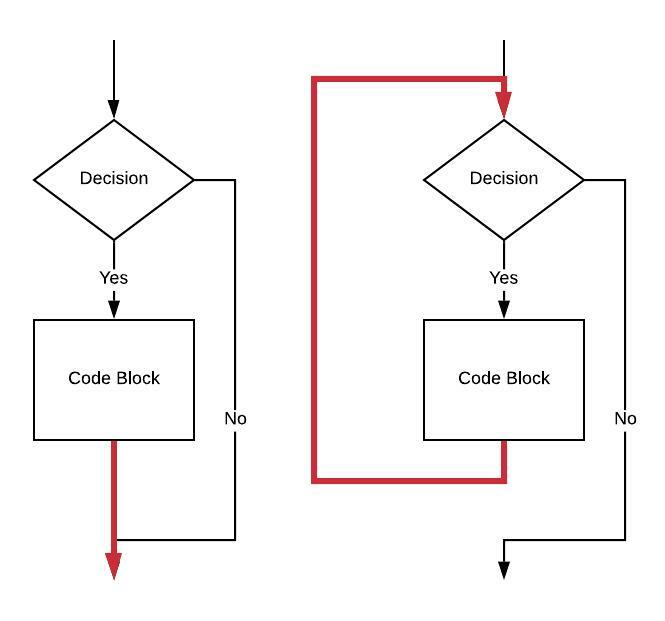
The closing brace in an if statement is indicated by the red arrow head. This isn't a branch, the code flow simply falls through to the statement beyond the closing brace. In the while loop, the behavior of the closing brace changes to be that of a branch back to just before the evaluation of the boolean condition (the "Decision").
A new label is placed before evaluating the "Decision".
A new unconditional branch is placed after the end of the "Code Block."
For review, here is the assembly language for an if statement:
    // Assume value of a is in x0                                       // 1
    // Assume value of b is in x1                                       // 2
    cmp     x0, x1                                                      // 3
    ble     1f                                                          // 4
    // CODE BLOCK                                                       // 5
1:                                                                      // 6
Here is the code for the while showing one new label and one new unconditional branch:
    // Assume value of a is in x0                                       // 1
    // Assume value of b is in x1                                       // 2
                                                                        // 3
 1: cmp     x0, x1                                                      // 4
    ble     2f                                                          // 5
    // CODE BLOCK                                                       // 6
    b       1b                                                          // 7
                                                                        // 8
2:                                                                      // 9
Temporary label 2 on line 9 takes the place of the line after the closing brace in a while loop.